LinkButton
The <LinkButton> component provides a visually distinct, button-like element that functions as a navigational link. It combines the accessibility and semantics of a link with the appearance and interactivity of a button, making it ideal for scenarios where users need a clear call-to-action that leads to another page or resource.
Anatomy
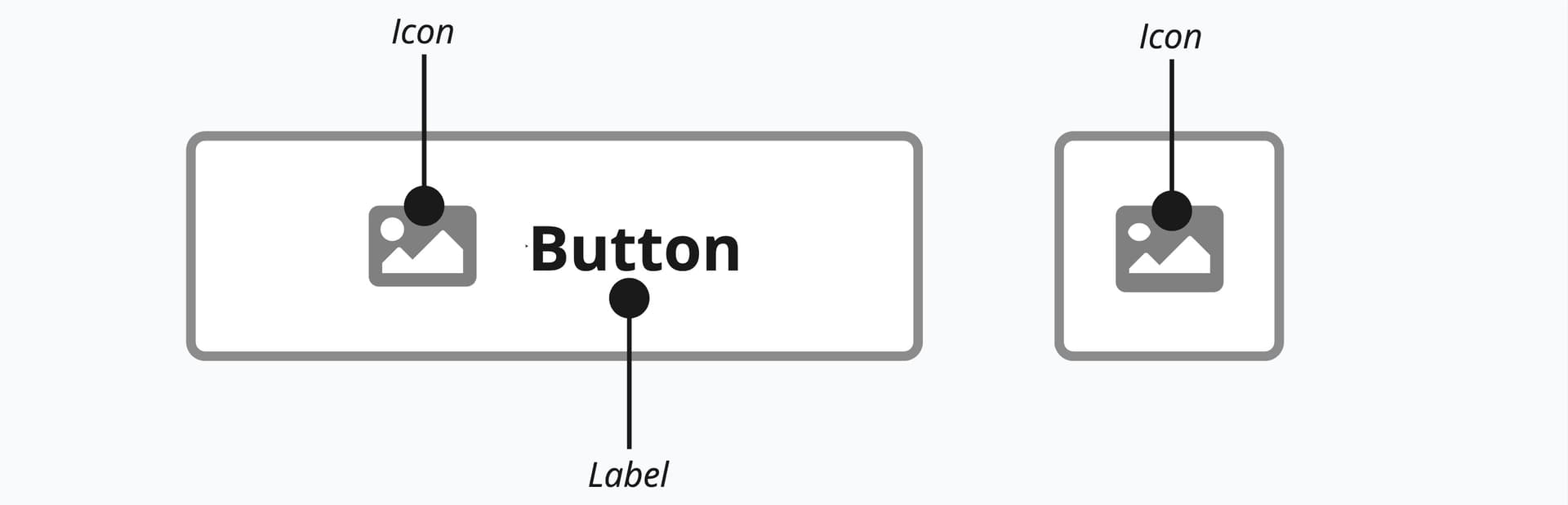
A link button consists of a pressable area, often containing a textual label or icon, which users can press or activate using the Space or Enter keys.
Appearance
The appearance of a component can be customized using the variant and size props. These props adjust the visual style and dimensions of the component, available values are based on the active theme.
| Property | Type | Description |
|---|---|---|
variant | primary | secondary | ghost | destructive | destructive-ghost | link | The available variants of this component. |
size | default | small | large | icon | The available sizes of this component. |
Usage
A link button should be used whenever the primary user action is navigation. It is the ideal choice when you need the visual prominence of a button for a call-to-action that directs the user to a different page or URL. For example, a "Sign Up Now" or "Learn More" element that takes the user to a new registration or features page is a perfect use case. Using a link button ensures that standard browser behaviors, such as opening a link in a new tab or copying the address, are preserved.
In contrast, a regular button is meant for performing an action on the current page. You should use a regular button when the user is submitting a form, opening a modal window, toggling a setting, or saving data without changing the URL. Essentially, if the component's purpose is to do something on the current view, use a button. If it is meant to go somewhere else, use a link button.
The link button is the button's visual twin, so it must follow all the same guidelines. The only difference is that it's a link used for navigation.
View button guidelinesProps
aria-describedby?string;
aria-details?string;
aria-label?string;
aria-labelledby?string;
autoFocus?boolean;
children?ReactNode;
dir?string;
disabled?boolean;
"false"download?string | boolean;
fullWidth?boolean;
"false"hidden?boolean;
href?string;
hrefLang?string;
id?string;
inert?boolean;
lang?string;
onAnimationEnd?AnimationEventHandler<HTMLAnchorElement>;
onAnimationEndCapture?AnimationEventHandler<HTMLAnchorElement>;
onAnimationIteration?AnimationEventHandler<HTMLAnchorElement>;
onAnimationIterationCapture?AnimationEventHandler<HTMLAnchorElement>;
onAnimationStart?AnimationEventHandler<HTMLAnchorElement>;
onAnimationStartCapture?AnimationEventHandler<HTMLAnchorElement>;
onAuxClick?MouseEventHandler<HTMLAnchorElement>;
onAuxClickCapture?MouseEventHandler<HTMLAnchorElement>;
onBlur?(e: FocusEvent<Element, Element>) => void;
onClick?(e: MouseEvent<FocusableElement, MouseEvent>) => void;
onPress instead. onClick is an alias for onPress
provided for compatibility with other libraries. onPress provides
additional event details for non-mouse interactions.onClickCapture?MouseEventHandler<HTMLAnchorElement>;
onContextMenu?MouseEventHandler<HTMLAnchorElement>;
onContextMenuCapture?MouseEventHandler<HTMLAnchorElement>;
onDoubleClick?MouseEventHandler<HTMLAnchorElement>;
onDoubleClickCapture?MouseEventHandler<HTMLAnchorElement>;
onFocus?(e: FocusEvent<Element, Element>) => void;
onFocusChange?(isFocused: boolean) => void;
onGotPointerCapture?PointerEventHandler<HTMLAnchorElement>;
onGotPointerCaptureCapture?PointerEventHandler<HTMLAnchorElement>;
onHoverChange?(isHovering: boolean) => void;
onHoverEnd?(e: HoverEvent) => void;
onHoverStart?(e: HoverEvent) => void;
onKeyDown?(e: KeyboardEvent) => void;
onKeyUp?(e: KeyboardEvent) => void;
onLostPointerCapture?PointerEventHandler<HTMLAnchorElement>;
onLostPointerCaptureCapture?PointerEventHandler<HTMLAnchorElement>;
onMouseDown?MouseEventHandler<HTMLAnchorElement>;
onMouseDownCapture?MouseEventHandler<HTMLAnchorElement>;
onMouseEnter?MouseEventHandler<HTMLAnchorElement>;
onMouseLeave?MouseEventHandler<HTMLAnchorElement>;
onMouseMove?MouseEventHandler<HTMLAnchorElement>;
onMouseMoveCapture?MouseEventHandler<HTMLAnchorElement>;
onMouseOut?MouseEventHandler<HTMLAnchorElement>;
onMouseOutCapture?MouseEventHandler<HTMLAnchorElement>;
onMouseOver?MouseEventHandler<HTMLAnchorElement>;
onMouseOverCapture?MouseEventHandler<HTMLAnchorElement>;
onMouseUp?MouseEventHandler<HTMLAnchorElement>;
onMouseUpCapture?MouseEventHandler<HTMLAnchorElement>;
onPointerCancel?PointerEventHandler<HTMLAnchorElement>;
onPointerCancelCapture?PointerEventHandler<HTMLAnchorElement>;
onPointerDown?PointerEventHandler<HTMLAnchorElement>;
onPointerDownCapture?PointerEventHandler<HTMLAnchorElement>;
onPointerEnter?PointerEventHandler<HTMLAnchorElement>;
onPointerLeave?PointerEventHandler<HTMLAnchorElement>;
onPointerMove?PointerEventHandler<HTMLAnchorElement>;
onPointerMoveCapture?PointerEventHandler<HTMLAnchorElement>;
onPointerOut?PointerEventHandler<HTMLAnchorElement>;
onPointerOutCapture?PointerEventHandler<HTMLAnchorElement>;
onPointerOver?PointerEventHandler<HTMLAnchorElement>;
onPointerOverCapture?PointerEventHandler<HTMLAnchorElement>;
onPointerUp?PointerEventHandler<HTMLAnchorElement>;
onPointerUpCapture?PointerEventHandler<HTMLAnchorElement>;
onPress?(e: PressEvent) => void;
onPressChange?(isPressed: boolean) => void;
onPressEnd?(e: PressEvent) => void;
onPressStart?(e: PressEvent) => void;
onPressUp?(e: PressEvent) => void;
onScroll?UIEventHandler<HTMLAnchorElement>;
onScrollCapture?UIEventHandler<HTMLAnchorElement>;
onTouchCancel?TouchEventHandler<HTMLAnchorElement>;
onTouchCancelCapture?TouchEventHandler<HTMLAnchorElement>;
onTouchEnd?TouchEventHandler<HTMLAnchorElement>;
onTouchEndCapture?TouchEventHandler<HTMLAnchorElement>;
onTouchMove?TouchEventHandler<HTMLAnchorElement>;
onTouchMoveCapture?TouchEventHandler<HTMLAnchorElement>;
onTouchStart?TouchEventHandler<HTMLAnchorElement>;
onTouchStartCapture?TouchEventHandler<HTMLAnchorElement>;
onTransitionCancel?TransitionEventHandler<HTMLAnchorElement>;
onTransitionCancelCapture?TransitionEventHandler<HTMLAnchorElement>;
onTransitionEnd?TransitionEventHandler<HTMLAnchorElement>;
onTransitionEndCapture?TransitionEventHandler<HTMLAnchorElement>;
onTransitionRun?TransitionEventHandler<HTMLAnchorElement>;
onTransitionRunCapture?TransitionEventHandler<HTMLAnchorElement>;
onTransitionStart?TransitionEventHandler<HTMLAnchorElement>;
onTransitionStartCapture?TransitionEventHandler<HTMLAnchorElement>;
onWheel?WheelEventHandler<HTMLAnchorElement>;
onWheelCapture?WheelEventHandler<HTMLAnchorElement>;
ping?string;
ref?Ref<HTMLAnchorElement>;
ref.current to null
(or call the ref with null if you passed a callback ref).
@see {@link https://react.dev/learn/referencing-values-with-refs#refs-and-the-dom React Docs}referrerPolicy?HTMLAttributeReferrerPolicy;
rel?string;
render?(
props:
| DetailedHTMLProps<LinkWithRequiredHref, HTMLAnchorElement>
| DetailedHTMLProps<HTMLAttributes<HTMLSpanElement>, HTMLSpanElement>,
renderProps: LinkRenderProps,
) => ReactElement<...>;
'href' in props in order to tell whether to render an <a> element.
Requirements:
- You must render the expected element type (e.g. if
<a>is expected, you cannot render a<button>). - Only a single root DOM element can be rendered (no fragments).
- You must pass through props and ref to the underlying DOM element, merging with your own prop as appropriate.
routerOptions?undefined;
slot?string | null;
null value indicates that the local props completely override all props received from a parent.target?HTMLAttributeAnchorTarget;
translate?"yes" | "no";